COLDCARD Phishing Campaign Exploits Vulnerability Fears to Install Remote Access
A sophisticated phishing campaign is leveraging recent concerns over a reported random number generation flaw and an $88.6 million Bitcoin theft affecting **COLDCARD** hardware wallets. Threat actors are impersonating **COLDCARD** support to trick users into installing **ConnectWise ScreenConnect** remote access software, granting them full control over victims' systems.
A new phishing campaign has emerged, preying on the anxieties surrounding a recently disclosed vulnerability in **COLDCARD** hardware wallets and a suspected $88.6 million Bitcoin theft. The campaign, identified by cybersecurity firm **Proofpoint**, aims to deceive users into installing remote access software by impersonating **COLDCARD** and claiming a security audit is underway.
### Exploiting Recent COLDCARD Incidents
The phishing efforts follow reports of attackers stealing approximately 1,367 Bitcoin, valued at an estimated $88.6 million, from 4,585 addresses. This theft is believed to be linked to a random number generation flaw impacting multiple **COLDCARD** models and firmware versions.
### The Phishing Lure: A Fake Security Audit
The phishing emails originate from `[email protected]` with the subject line "Hardware audit now available." They inform recipients of a "coordinated security audit now underway across the **COLDCARD** device network," urging participation to "verify the integrity of hardware across all revisions."
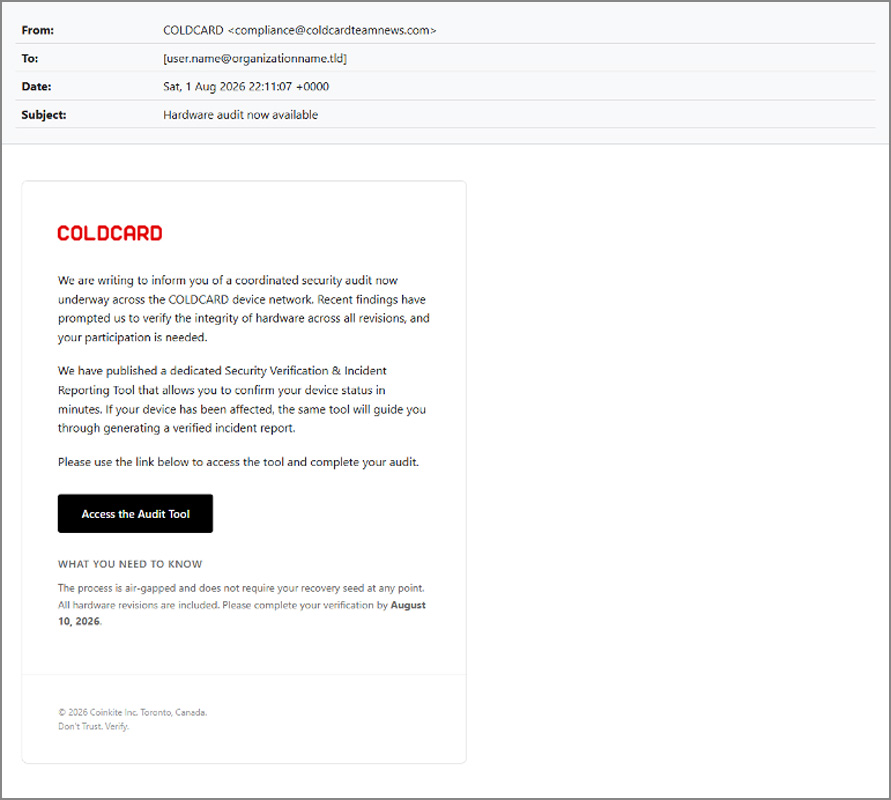
The emails direct users to an alleged "Security Verification & Incident Reporting Tool," falsely claiming the process is air-gapped, will not request recovery seeds, and must be completed by August 10.
### Deceptive Website and Live Support
Clicking the "Access the Audit Tool" button leads to `coldcardcompliance.com`, a spoofed website that meticulously imitates the legitimate **COLDCARD** site. It prompts users to click "Start Hardware Audit" to download the supposed tool.
The fake website also features a live "Customer Service" chat, designed to provide a veneer of legitimacy and interact directly with victims. **Proofpoint** reports that these chat interactions are likely handled by real people, enabling attackers to address concerns and pressure hesitant users into proceeding.
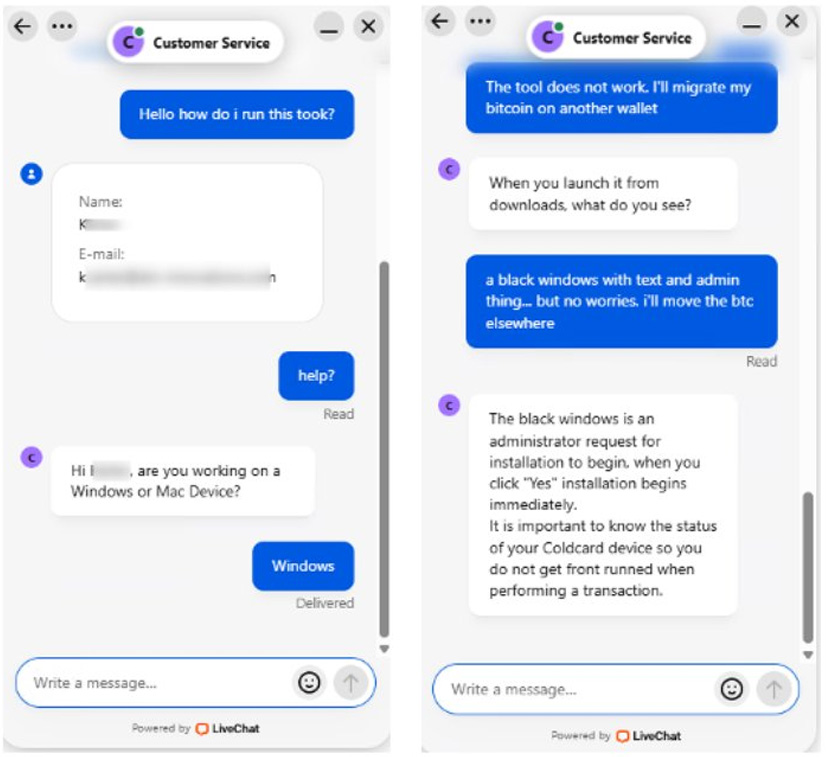
During these chats, operators inquire about the victim's operating system and instruct Windows users to run the downloaded tool. When users encounter administrator prompts, the operators reassure them it's necessary for installation.
### The Malicious Payload: ScreenConnect Remote Access
Clicking the "Start Hardware Audit" button on the phishing site initiates the download of a batch file named `Coldcard_Diagnostic_Tool.bat` from a **GitHub** account. Analysis of the 25.7MB batch file reveals two Base64-encoded files embedded within.
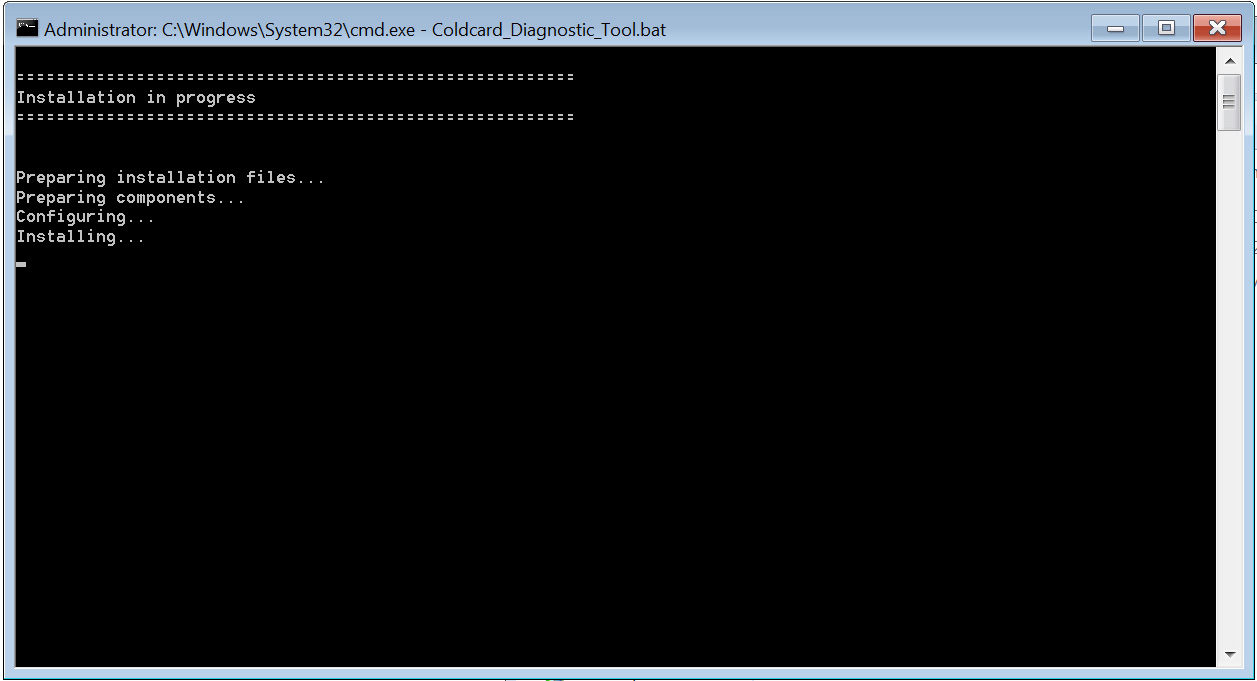
Upon execution, the script first simulates a diagnostic check. Concurrently, it verifies administrator privileges and, if absent, uses **PowerShell** to relaunch itself with a User Account Control prompt for elevated permissions.
The script then decodes the embedded Base64 files, saving them as `setup.msi` and `docusign.exe` in a randomly named directory within the Windows temp folder. While `docusign.exe` is a legitimate, signed executable for a **DocuSign** printer driver, acting as a decoy, the `setup.msi` file is a **ConnectWise ScreenConnect** installer.
**ConnectWise ScreenConnect** is a legitimate remote management tool. However, in this context, its installation grants the threat actor remote access to the victim's device. **Proofpoint** observed that the installed **ScreenConnect** connects to `activeretirementrelocation[.]com`, identified as the command-and-control server used by the attackers.
Once remote access is established via **ScreenConnect**, the attackers gain the ability to fully control the compromised computer, enabling them to steal data or cryptocurrency, or deploy additional malware, including ransomware.