Beyond the Endpoint: Why EDR Falls Short in Browser-Centric SaaS Attacks
Endpoint Detection and Response (EDR) is crucial for detecting host-based threats, but its effectiveness diminishes in environments heavily reliant on SaaS applications and browser-centric workflows. A new report highlights how sophisticated attacks are increasingly bypassing EDR by operating entirely within the browser, exploiting user sessions, extensions, and identity flows.

While **EDR** remains indispensable for detecting malicious code execution on a host, a critical blind spot is emerging in modern, **SaaS**-heavy environments. As organizations increasingly rely on cloud applications accessed primarily through web browsers, attackers are adapting, executing sophisticated campaigns that leave minimal endpoint artifacts for **EDR** to flag.
An employee can authenticate to a cloud application, approve an **OAuth** request, open sensitive files, or upload data – all within a browser session. These actions may never create a new attacker-controlled executable or process that traditional endpoint defenses would classify as malicious.
Consider the 2025 **Salesloft Drift** incident, where **UNC6395** obtained **OAuth** tokens from **Drift** integrations. These tokens were then used to make high-volume **API** calls against customers’ **Salesforce** environments, enabling data theft without any malware process for **EDR** to inspect.
The browser has become the primary access layer for corporate **SaaS** applications, identity workflows, files, and admin consoles. **NordLayer**'s **Browser Security Report 2026** found that browser access is present across all 504 reviewed applications, with 79% available *only* through the browser. This makes browser sessions a core location for user actions that may not produce the endpoint artifacts **EDR** was built to analyze.
**EDR** excels at detecting host execution, malware, persistence, and process-level behavior. However, in **SaaS**-heavy environments, many attacks are carried out through browser and identity workflows that do not generate the endpoint artifacts **EDR** is designed to inspect. This includes adversary-in-the-middle (AiTM) phishing, malicious browser extensions, unauthorized uploads, or clipboard-based execution lures.
## Adversary-in-the-Middle (AiTM) Phishing
In 2026, **Microsoft** tracked a threat actor, **Storm-2755**, targeting Canadian employees through search engine poisoning and malicious ads. Victims searching for terms like “Office 365” were redirected to attacker-controlled **Microsoft 365** login pages. The **AiTM** infrastructure then proxied the authentication flow in real-time, capturing credentials, session cookies, and **OAuth** access tokens.
**Storm-2755** then replayed the stolen session, with **Microsoft** observing the same session ID switch from the victim’s browser to an **Axios** user agent, indicating token reuse from attacker-controlled infrastructure. Attackers accessed **Microsoft** services, searched for payroll and **HR** information, created inbox rules to hide messages about banking changes, and accessed **Workday**.
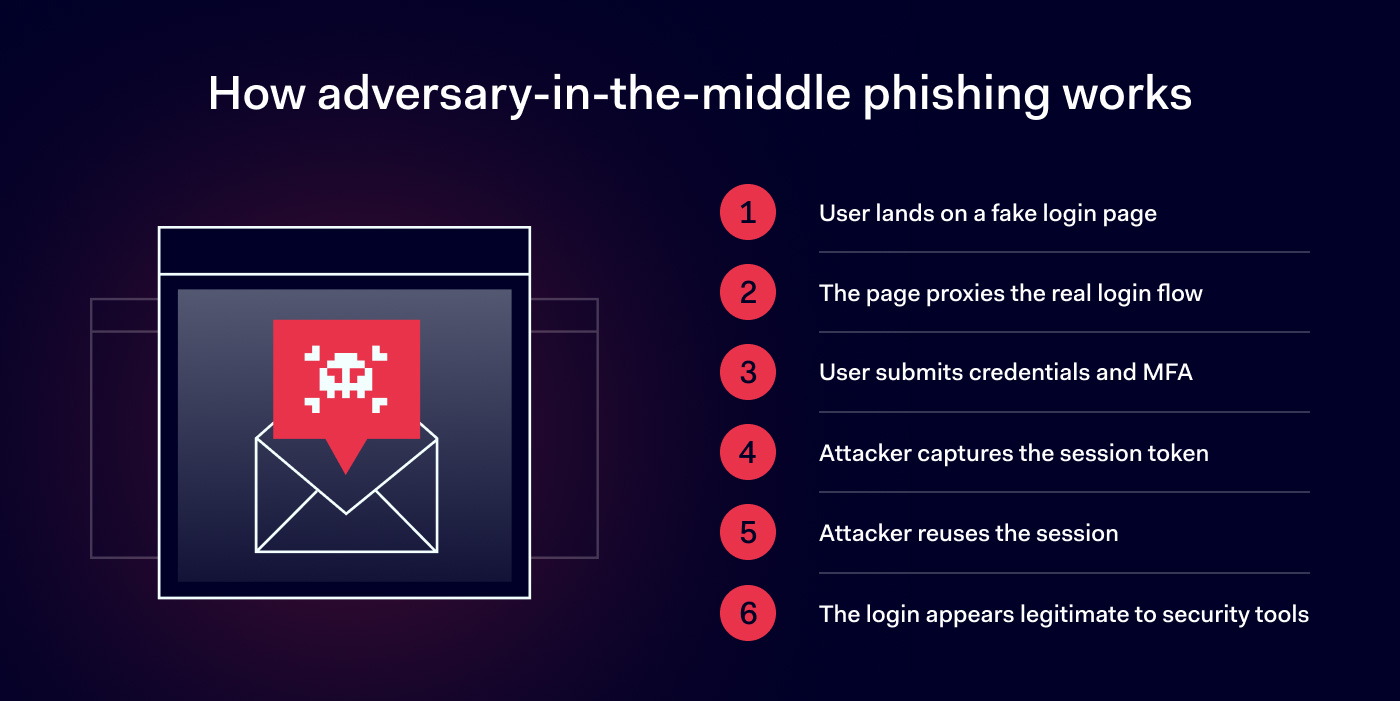
The mechanics are typical of **AiTM** phishing: a victim interacts with a phishing page that acts as a proxy between the user and the legitimate identity provider. This page collects credentials, relays **MFA** challenges, and passes responses to the real service, allowing the attacker to capture authenticated session material.
From ordinary endpoint process telemetry, this authentication flow may appear legitimate. The endpoint may not reveal that an **AiTM** proxy has intercepted the session, although other endpoint, identity, network, or **XDR** signals *can* expose the attack.
The most effective prevention for many **AiTM** attacks is phishing-resistant **FIDO2 WebAuthn** authentication, where the authentication response is cryptographically tied to the legitimate origin. Additionally, browser controls can help block known phishing destinations, restrict access to unapproved web applications, and stop attacks earlier.
## Compromised Browser Extensions
Browser extensions present a different visibility challenge. Their files reside within the browser profile, and their code executes inside browser processes. While **EDR** *might* detect a suspicious extension or unusual network activity, the extension’s behavior can still appear ordinary at the host level.
A malicious extension can use standard browser **APIs** to read page content, observe **URLs**, interact with forms, and send data over **HTTPS**. None of these actions necessarily require a new process or a suspicious executable. Without browser-specific context, a security team might observe browser traffic but lack the information to know which extension initiated it, what data it accessed, or if the extension was approved.
In March 2026, **Microsoft** reported on malicious **Chromium** extensions disguised as **AI** assistants. These extensions were installed approximately 900,000 times, with activity confirmed across more than 20,000 enterprise tenants. They collected visited **URLs** and content from **ChatGPT** and **DeepSeek** conversations, periodically sending this data to attacker-controlled infrastructure.
Here, the host shows an ordinary browser process making **HTTPS** connections, while the security-relevant action is an extension reading and exporting page content. Endpoint tools may detect parts of this activity, but extension inventory, permissions, and policy provide the crucial context needed to determine if such behavior should be allowed.
Security teams should control the extension layer directly, rather than waiting for a malicious domain, known malware signature, or endpoint alert. Organizations need extension allowlists, installation controls, and permission reviews for any extension that can read or modify web content.
## Browser Attacks Before Endpoint Execution
Some browser attacks complete entirely within the web session. A compromised website, malicious advertisement, or injected script can alter rendered content, read page-accessible data, redirect the session, or manipulate the clipboard. These actions can occur within browser-granted permissions, without needing to write files, launch malware, or create a new process. A user could also upload a sensitive file or paste confidential text into an unauthorized **SaaS** or **AI** service without any malware installation.
While potentially damaging, these actions don't necessarily create the artifacts **EDR** is designed to find. For instance, **ClickFix** attacks use fake verification prompts or other web content to persuade a victim to copy and execute a malicious command.
**Microsoft** observed this sequence in its August 2026 **TerminalFix** campaign, a **ClickFix** variant that compromised websites and displayed fake **Cloudflare CAPTCHA** prompts. Clicking the fake verification step copied a malicious **PowerShell** command to the clipboard, while the page instructed the victim to open **Windows Terminal** or **PowerShell** and paste it.
Up to this point, the attacker relied on browser content, clipboard manipulation, and user interaction. Executing the command shifted the telemetry: **PowerShell** ran, a **ZIP** archive was downloaded and extracted, **DLL** side-loading followed, registry and scheduled-task persistence were created, **Active Directory** discovery began, and the compromised host established a reverse tunnel.
Browser controls can stop the attack *before* host execution by blocking the malicious page, restricting clipboard access, or limiting risky browser actions. If the user runs the copied command, the activity moves into endpoint telemetry, where **EDR** can then inspect **PowerShell** execution, downloaded files, persistence, discovery, and outbound connections.
## The Control Should Match the Action
**EDR** alone cannot cover every high-risk action in a **SaaS**-heavy environment. If security teams expect endpoint telemetry to flag every malicious login, **OAuth** approval, browser upload, or extension action, they risk missing activity that never culminates in host execution.
A robust security posture for **SaaS**-heavy environments requires controls at three interconnected layers:
1. Browser
2. Identity and **SaaS**
3. Endpoint