Hirudo Android Malware Bypasses Banking App Security, Steals Credentials
A sophisticated new Android malware, dubbed **Hirudo**, is actively targeting banking users by replacing legitimate financial applications with malicious, security-bypassing versions. This advanced threat not only steals credentials but also grants attackers real-time remote control, highlighting a concerning escalation in mobile banking fraud tactics.

A new Android malware, **Hirudo**, has been identified as a significant threat to mobile banking security. This malware operates by replacing legitimate banking applications with modified versions that effectively disable crucial security checks, allowing it to steal sensitive financial credentials.
Mobile security firm **ThreatFabric** detailed in a recent report that **Hirudo** has been observed impersonating at least seven Indonesian banks. The threat also extends to financial institutions in China, India, Mexico, Morocco, and Thailand.
### How Hirudo Infects Devices
**Hirudo** is typically delivered through seemingly innocuous applications such as shopping apps (**Shopora**), adult content apps (**1V1 X**), or short drama apps (**ZoyaTV**, **KoiShort**). These applications function as malware loaders, presenting users with a fake "update" notification that prompts them to grant extensive permissions, including for Accessibility services.
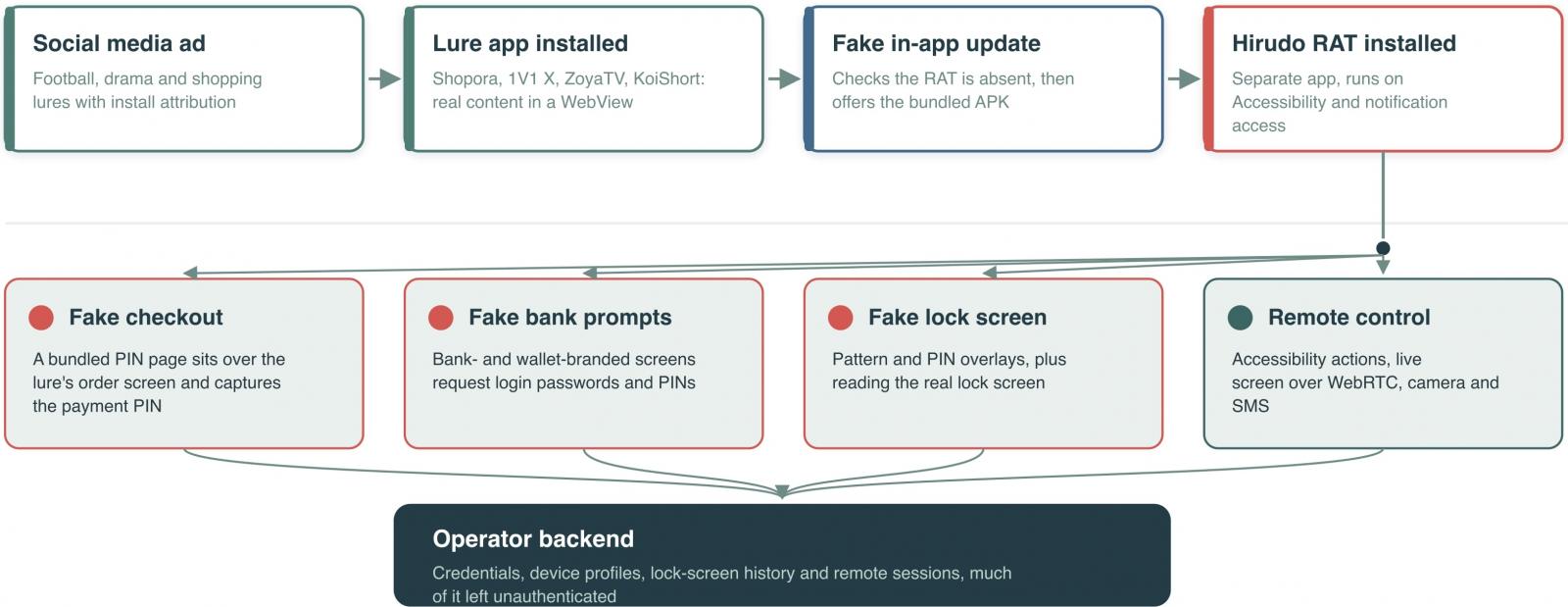
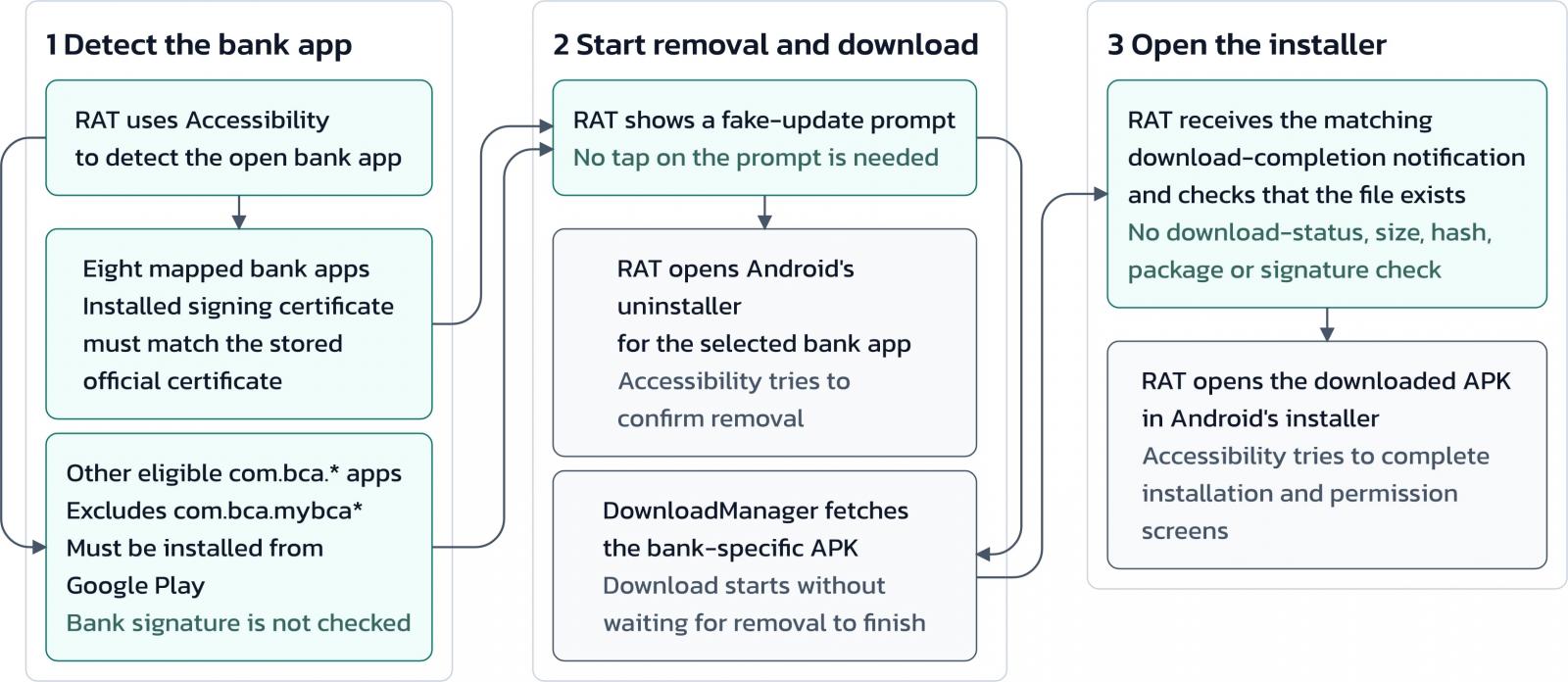
Once granted, **Hirudo** initiates a complex and somewhat risky process: it launches the uninstaller for the genuine banking app, downloads a patched, malicious copy, and then leverages its Accessibility permissions to install the compromised version. **ThreatFabric** notes that this multi-step process presents two potential points where a vigilant user could interrupt the installation.
### Sophisticated Evasion Techniques
**ThreatFabric**'s analysis revealed that the malicious banking app copy retains almost all of the original app's code but integrates a sophisticated hooking engine. This engine is built upon the open-source frameworks **YAHFA** and **Dobby**.
Upon launch, the patched application executes several evasion maneuvers:
* **Certificate Substitution:** It substitutes the genuine signing certificate when queried.
* **Accessibility Service Hiding:** It conceals enabled Accessibility services.
* **Screenshot Protection Removal:** It disables screenshot protection, enabling remote viewing and recording.
* **Play Integrity Bypass:** It modifies key-attestation certificates and relays **Play Integrity** requests through an attacker-controlled server.
"With the engine running inside the banking app's own process, the app's defenses are turned against it," the researchers stated, highlighting the cunning nature of this attack.
.jpg)
### Data Theft and Limitations
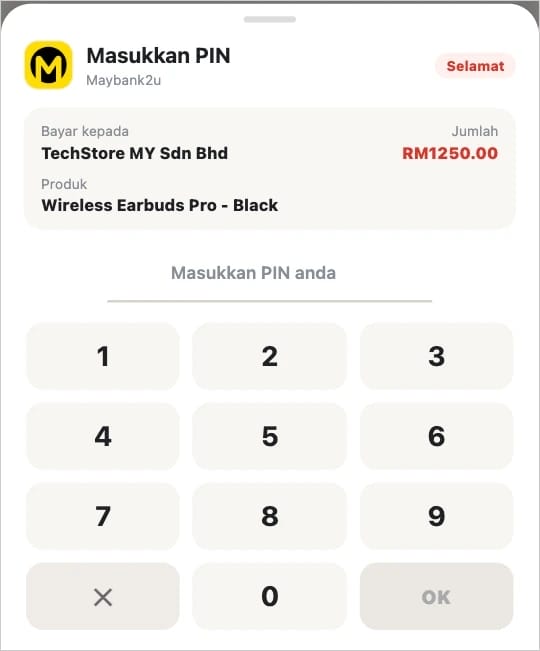
Once active, **Hirudo** can steal a wide array of sensitive data, including banking passwords, payment PINs, device-unlock secrets, and SMS messages. It can also stream the device's screen to operators and access both front and rear cameras. The malware employs fake checkout pages to collect payment PINs, displaying a fabricated payment-success result to deceive victims while data is exfiltrated.
While highly effective, **Hirudo**'s evasion methods do have limitations. **ThreatFabric** found that the bundled attestation keybox has been publicly leaked, and **Google** has listed two of its certificates as compromised. This means server-side revocation checks can potentially detect these forgeries.
### Recommendations for Banks and Users
**ThreatFabric** emphasizes that **Hirudo** represents a "deliberate escalation in how Android bankers approach hardened applications," shifting the attack focus from device-level integrity to the security mechanisms embedded within banking apps themselves.
For financial institutions, the researchers recommend implementing robust server-side validation for integrity and attestation. They also advise binding these checks to specific sessions and protected actions, in addition to maintaining behavioral and transaction-risk controls.
Android users are strongly urged to keep their devices and applications updated, exercise extreme caution when installing APK files from unofficial sources, and regularly run **Google Play Protect** scans to detect and remove malicious software.