GPU Mining Malware Spreads via AI Search Result Poisoning, Targets High-Performance Systems
A sophisticated cryptojacking campaign is targeting systems with high-performance GPUs through SEO poisoning and manipulated AI chatbot recommendations. Attackers are leveraging malicious download pages for popular utility software to compromise machines and deploy cryptocurrency miners.


Threat actors are actively targeting systems equipped with high-performance computers in an ongoing cryptojacking campaign. The attack is spread through a coordinated SEO poisoning operation that also manipulates AI chatbot recommendations.
### Infection Vector
The compromise occurs through malicious download pages disguised as legitimate utility software. These utilities are typically installed by owners of powerful systems and include tools like **CrystalDiskInfo**, **HWMonitor**, **Display Driver Uninstaller**, **FurMark**, **K-Lite Codec Pack**, and **PDFgear**.
Once a system is infected, the attacker gains persistent access by deploying the legitimate remote management tool **ScreenConnect**. This allows them to install additional malware later.
### SEO Poisoning and AI Manipulation
Researchers at **Microsoft** discovered the campaign and determined that the attack begins when users search for one of the aforementioned utilities. The search results are manipulated through SEO poisoning to prominently display malicious links.
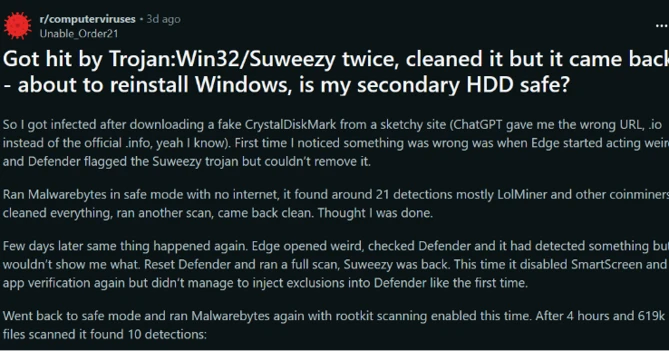
Reports indicate that users were also directed to the malicious domains after interacting with AI-based assistants. "In these cases, users querying AI chatbots for software download recommendations were presented with links to attacker‑controlled domains within generated responses," **Microsoft** stated.
### Malware Delivery and Persistence
The malicious download is a ZIP archive hosted on a subdomain at `gleeze[.]com`, a domain previously flagged for phishing activity. The archive contains both the legitimate executable for the utility and a malicious DLL. The DLL is automatically loaded when the benign binary is launched.
According to **Microsoft**, the DLL uses `msiexec.exe` to install `vcredist_x64.dll`, a package installer for the **ScreenConnect** remote access tool.
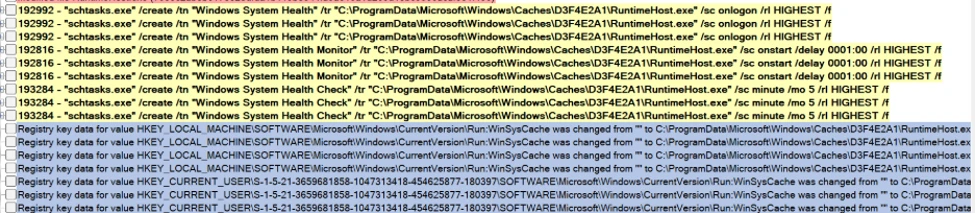
After establishing a **ScreenConnect** session, the attacker drops another binary named `SimpleRunPE.exe`, which copies itself as `RuntimeHost.exe` into a hidden folder. The purpose of this executable is to establish "six persistence mechanisms across multiple Windows autostart locations."
In some instances, the binary is dropped via a malicious PowerShell script and saved locally as `vlc.exe`, impersonating the popular **VideoLAN** multimedia player executable.
### Process Hollowing and Defense Evasion
Based on `SimpleRunPE.exe`’s Program Database (PDB) path, researchers believe it is a fork of a public repository demonstrating the process hollowing technique. The threat actor uses this technique for stealth, injecting malicious code into legitimate **Microsoft**-signed .NET binaries such as `InstallUtil.exe`, `RegAsm.exe`, `RegSvcs.exe`, `MSBuild.exe`, `AppLaunch.exe`, `AddInProcess.exe`, and `aspnet_compiler.exe`.
The malicious binary also invokes PowerShell to add its path and process to the exclusion list in **Microsoft Defender**.
### Virtual Machine and Analysis Tool Detection
Additionally, the malware checks the environment for virtual machines and a set of 40 process names corresponding to analysis tools. If any are identified, the malware terminates its execution.
### Cryptocurrency Mining
After completing the process hollowing stage and running inside a **Microsoft**-signed Windows utility, one of three mining modules is downloaded and executed. The supported mining programs are `gminer`, `lolMiner`, and `SRBMiner-MULTI`, all designed to utilize graphics processing units (GPUs).
**Microsoft** emphasizes that this cryptocurrency campaign is notable for its "targeting and monetization strategy engineered from the ground up to maximize GPU mining yield per compromised device," rather than focusing on infecting a large number of devices.
### Mitigation
Organizations can protect their environments by using the indicators of compromise (IOCs) included in the **Microsoft** report and ensuring their security software is up to date.