Microsoft Revamps Windows Insider Program for Enhanced Reliability and Feature Testing
**Microsoft** is rolling out a redesigned **Windows Insider Program** to address reliability concerns in **Windows 11** and improve the feedback loop with testers. The revamp aims to simplify the program's structure and increase transparency, providing Insiders with clearer access to experimental features.

**Microsoft** is overhauling the **Windows Insider Program** to create a more streamlined and transparent experience for testers, hoping to improve the overall development and reliability of **Windows 11**.
## Addressing Tester Frustrations
In a recent [blog post](https://blogs.windows.com/windows-insider/2026/04/10/improving-your-windows-insider-experience/), **Microsoft** acknowledged that the current channel structure is confusing. The initial simplification from Insider Rings to Channels (Beta, Dev, and Canary) has become convoluted over time.
The primary frustration stems from the lack of clarity on which channel to choose for early access to experimental features. **Microsoft's** **Controlled Feature Rollout (CFR)** often limits access, leaving many testers unable to try out features they read about. As **Alec Oot**, responsible for the **Windows Update** experience at **Microsoft**, stated, the gradual rollout approach is a major pain point for Insiders.
While tools like [ViveTool](https://www.bleepingcomputer.com/news/microsoft/how-to-enable-hidden-windows-11-features-with-microsoft-stagingtool/) can enable hidden features, it's not the intended user experience.
## Simplified and Transparent Channels
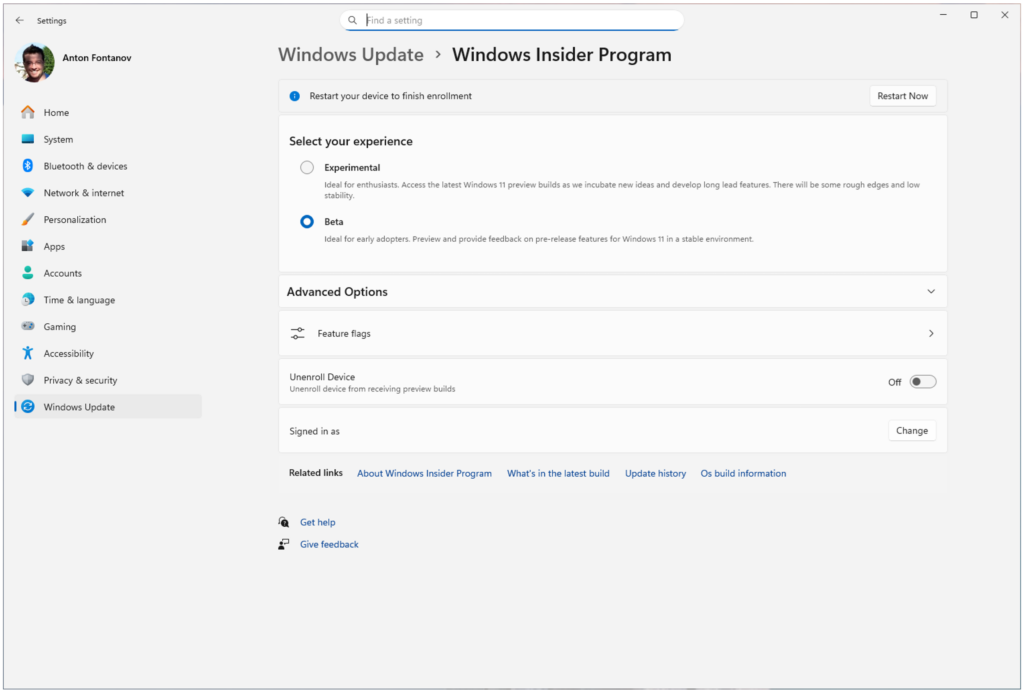
**Microsoft** is consolidating the **Windows Insider Program** into two primary channels:
* **Experimental:** Replacing the Dev and Canary channels, this is the go-to channel for testing highly experimental features that may never make it to production.
* **Beta:** An updated version of the original Beta Channel.
**Source: Microsoft**
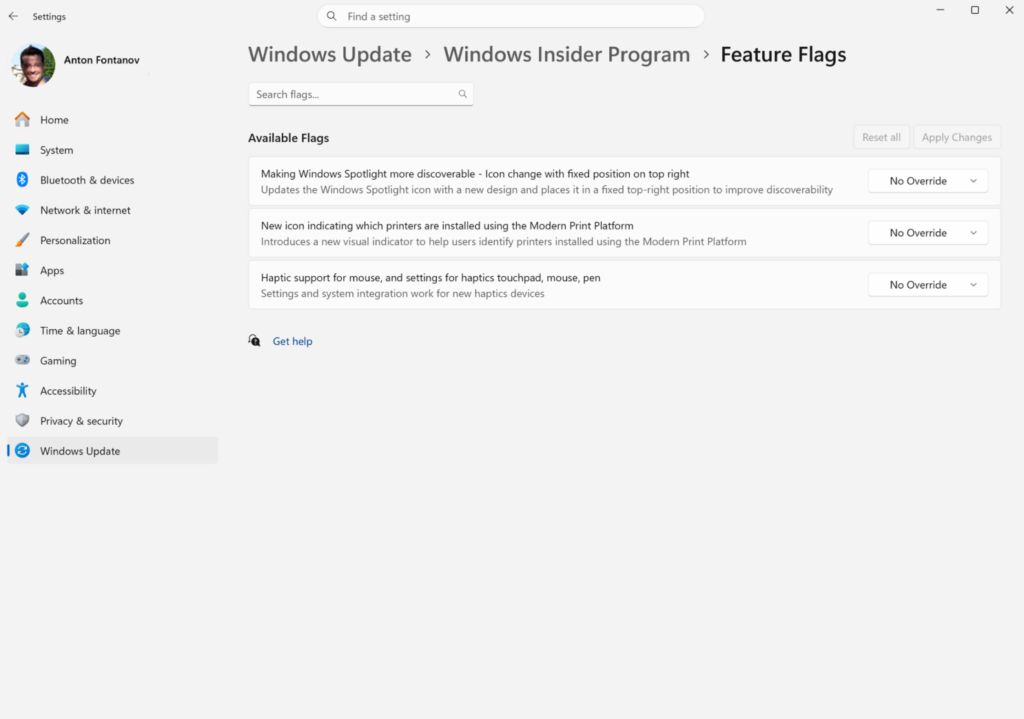
The Beta Channel will eliminate gradual feature rollouts, ensuring that all new features mentioned in release notes are immediately accessible to testers. The Experimental channel will offer some features out-of-the-box, while others will be locked behind feature flags.
**Source: Microsoft**
Users can manually toggle these experimental features within **Windows Settings** under **Windows Insider Program Settings** > **Feature flags**.
## Phased Rollout of New Channels
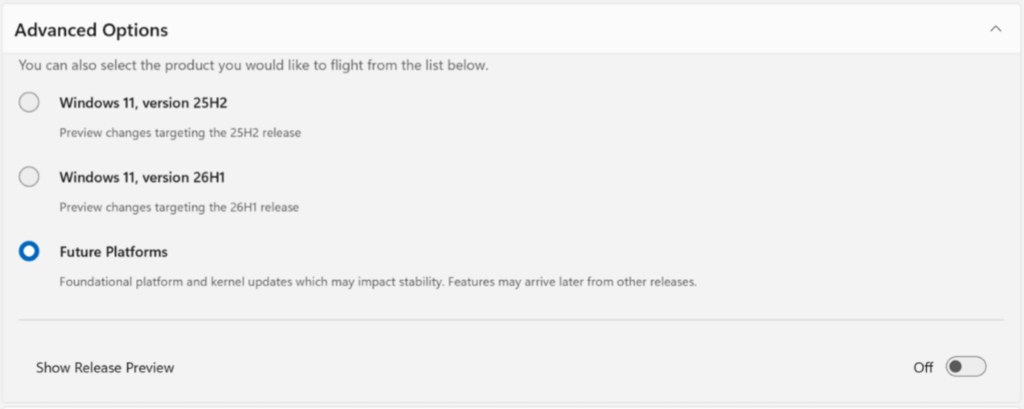
**Microsoft** [announced](https://blogs.windows.com/windows-insider/2026/04/24/were-moving-to-experimental-and-beta-announcing-new-builds/) a phased migration to the new channels, starting with Dev Channel users moving to Experimental. Users who don't see the new Experimental channel UI can manually enable it via Settings > Windows Update > Windows Insider Program > Feature flags.
Canary users will be moved to specific Experimental versions based on their installed build series: 28000 series to Experimental (26H1) and 29500 series to Experimental (Future Platforms).
**Source: Microsoft**
Beta Channel users will transition to the new Beta experience, with potential minor feature changes during the migration. **Microsoft** recommends moving from Beta to Dev (now Experimental) before the transition to retain access to all existing experimental features.
As part of the rollout, **Microsoft** is shipping Build 26220.8283 for Beta, Build 26300.8289 for Experimental, Build 28020.1873 for Experimental 26H1, and Build 29576.1000 for Experimental Future Platforms.
This update also includes early access to a new **Windows Update** experience, offering enhanced control over updates and reboots, as detailed [here](https://www.bleepingcomputer.com/news/microsoft/windows-update-gets-new-controls-to-reduce-forced-restarts/).
## [99% of What Mythos Found Is Still Unpatched.](https://hubs.li/Q04crVgD0)
AI chained four zero-days into one exploit that bypassed both renderer and OS sandboxes. A wave of new exploits is coming.
At the Autonomous Validation Summit (May 12 & 14), see how autonomous, context-rich validation finds what's exploitable, proves controls hold, and closes the remediation loop.
[Claim Your Spot](https://hubs.li/Q04crVgD0)