RedHook Android Malware Exploits Wireless ADB for Elevated Privileges Without Root
A sophisticated new variant of the **RedHook** Android malware has emerged, leveraging the **Android Wireless Debugging (Wireless ADB)** mechanism to gain shell-level privileges. This novel technique allows the malware to bypass traditional rooting requirements and execute powerful commands, significantly expanding its remote access capabilities.


Cybersecurity researchers at **Group-IB** have uncovered a significant upgrade to the **RedHook** Android malware. This latest iteration introduces a groundbreaking method for achieving elevated privileges on Android devices, without the need for a physical computer connection or device rooting.
### Autonomous Wireless ADB Abuse
The core innovation of this new **RedHook** variant lies in its abuse of **Android Debug Bridge (ADB)**. **ADB** is **Google**'s debugging interface, enabling command-line control over Android devices. While traditionally requiring a USB connection, **Wireless ADB**, introduced in **Android 11**, offers the same functionality over a network.
**RedHook** exploits this by first tricking users into granting it Accessibility permissions. These permissions are then used to programmatically manipulate device Settings, activate Developer Options, and enable **Wireless Debugging**.
Once **Wireless Debugging** is active, the malware autonomously retrieves the pairing code displayed on the screen. It then connects to the phone’s **ADB** service via the loopback interface (127.0.0.1). This self-pairing process grants **RedHook** shell (UID 2000) privileges, which are considerably more robust than standard application permissions.
Crucially, this entire attack chain does not require the device to be rooted, making it effective across a broader range of Android devices, provided the user is initially deceived into approving the Accessibility Service permission request.
### Leveraging Shizuku for Enhanced Control
Following the acquisition of shell privileges, **RedHook** deploys a **Shizuku**-based framework. **Shizuku** is a legitimate Android utility popular among developers and power users, which also operates without requiring a rooted device. **RedHook** integrates **Shizuku** code, executing it as a privileged server (libmx.so) to invoke privileged Android APIs as UID 2000.
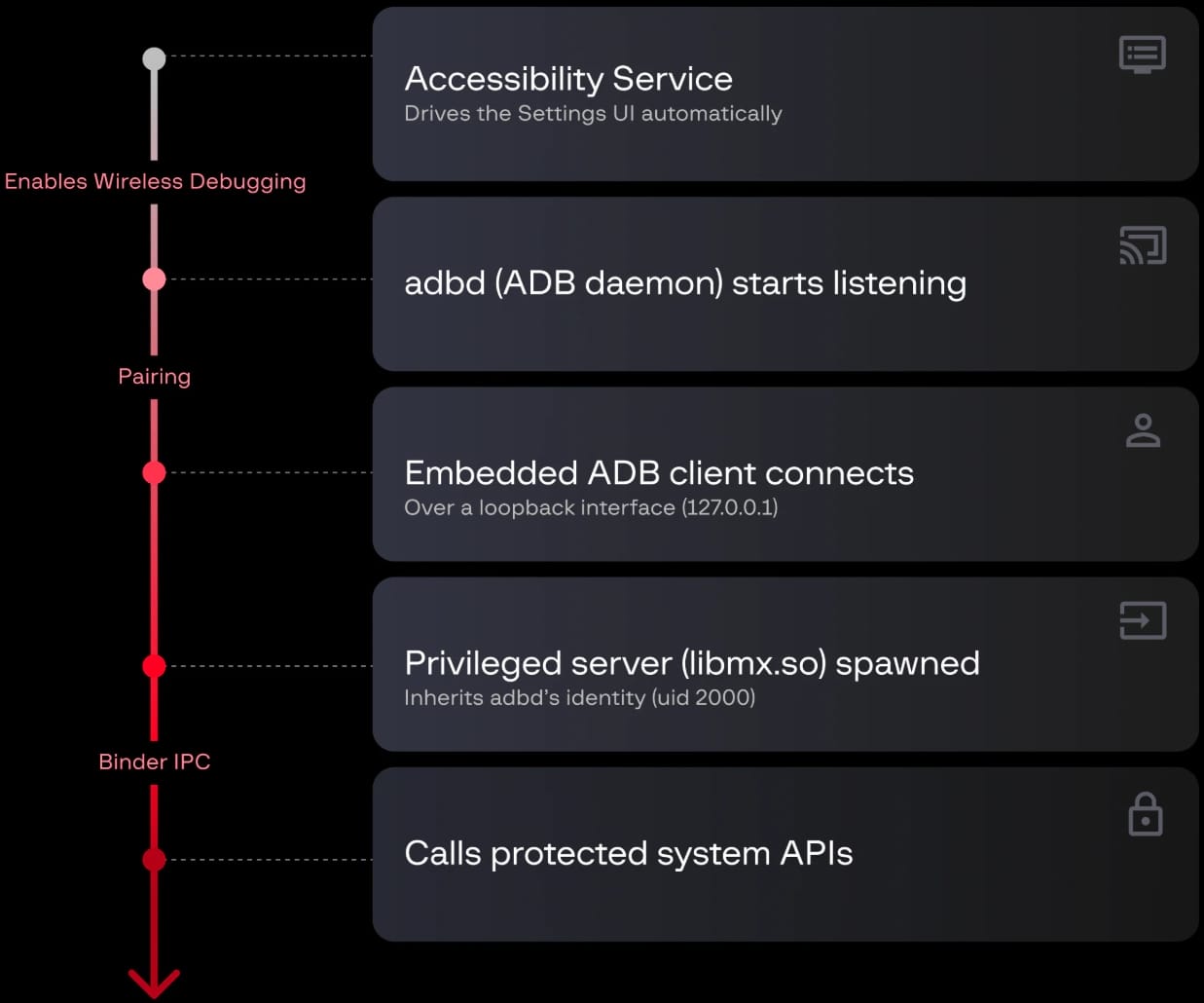
**RedHook malware attack chain**
*Source: Group-IB*
According to **Group-IB's** report, the current version of **RedHook** supports 53 server-issued commands, including:
* Screen streaming and screenshot capturing
* Simulating taps, swipes, gestures, dragging, and long clicks
* Device locking/unlocking
* Installing, launching, and uninstalling applications silently
* Collecting contacts, SMS, and application data
* Creating overlays or fake verification dialogs
* Activating the camera
* Rebooting the device
### Persistence and Distribution
The malware employs multiple sophisticated persistence mechanisms to maintain its foothold on compromised devices. These include using silent audio playback to elevate process priority, **WakeLocks** to prevent CPU sleep, and two mutually restarting services. Additional tactics involve a five-minute watchdog alarm, automatic restart after device boot, and setting `oom_score_adj` to -1000 to reduce the likelihood of termination under low memory conditions.
The latest **RedHook** version is primarily distributed through social engineering tactics. Attackers impersonate government agencies or financial institutions via messages and phone calls, directing victims to fake **Google Play** websites to download the malicious application.
### Recommendations for Users and IT Security Professionals
To mitigate the risk of **RedHook** infection, Android users are strongly advised to:
* Install applications exclusively from the official **Google Play** Store.
* Scrutinize all requested permissions during app installation, particularly Accessibility Service permissions.
* Ensure that **Google Play Protect** is active and up-to-date on their devices.