Windows 11 Gains Granular Privacy Controls for Desktop Apps
Microsoft is rolling out new privacy controls for Windows 11, allowing users to manage camera, microphone, and location access for individual desktop applications. This update, currently in testing with Windows Insiders, aims to enhance user transparency and control over sensitive data permissions, moving towards a smartphone-style security model.
## Microsoft Enhances Privacy in Windows 11 with Granular App Permissions
**Microsoft** has initiated testing for advanced privacy controls within **Windows 11**, empowering users to dictate which desktop applications can access their camera, microphone, and precise location data. This significant privacy enhancement is being rolled out to systems running **Windows 11 Insider Experimental Preview Build 26340.9233**.
The primary objective of this new feature is to simplify privacy permissions in **Windows 11** and streamline the management process for each desktop application.
"**Windows Insiders** can now manage camera, microphone, and location permissions for individual desktop apps. Previously, access for traditional desktop applications was managed through a single device-wide setting," **Microsoft** explained. "With this update, you can review and control access on an app-by-app basis, giving you greater visibility into which apps are requesting access to sensitive resources and more control over your privacy choices."
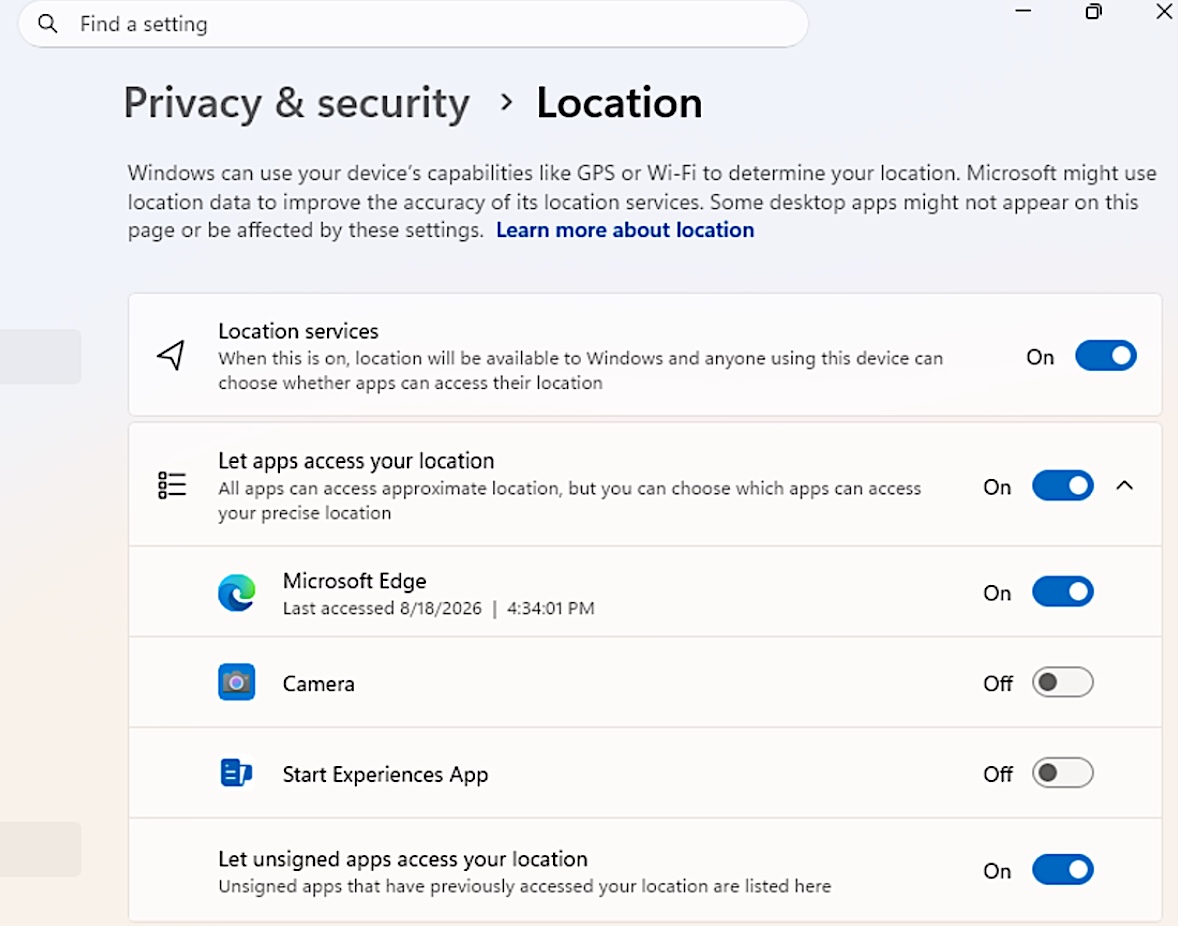
To review and manage these granular permissions, **Insiders** can navigate to Settings > Privacy & security > Camera, Microphone, or Location. Here, dedicated toggles allow users to grant or revoke access for specific applications.
### Trust and Verification Remain Key
**Microsoft** has issued a cautionary note, advising users to grant access only to applications they explicitly trust and recognize. The company highlights that some applications utilizing shared system components, browser-hosted experiences, or similar technologies might appear under a different name or as 'unsigned' if **Windows** cannot verify the publisher's information.
### A Shift Towards Mobile-Style Security
This development follows **Microsoft's** February announcement regarding its intentions to introduce smartphone-style app permission prompts in **Windows 11**. These prompts will require explicit user consent before applications can access sensitive resources like cameras and microphones.
**Logan Iyer**, a **Windows Platform** engineer, previously stated that the new security model was prompted by the growing issue of applications installing unwanted software, overriding settings, or modifying core **Windows** experiences without prior user consent.
"Users will have transparency and consent control over how apps access their personal data and device features," **Iyer** affirmed. "They will receive clear prompts to grant or deny apps permission to access protected data and hardware. Users will also be able to revoke permissions they have previously granted."
These mobile-style security controls are part of the "**Windows Baseline Security Mode**" and "**User Transparency and Consent**" initiatives. Their rollout will be phased, with **Microsoft** planning to adjust controls and deployment speed based on user feedback.
In a separate announcement on Friday, **Microsoft** also revealed testing for a new accessibility setting that automatically maximizes app windows upon opening for users operating in tablet mode, utilizing screen readers or magnification, or those who prefer a full-screen workspace.